
Q
We have an account we are not currently using for reporting or viewing data. How do we avoid being charged for this account?
A
You can deactivate accounts under Media as follows.
Deactivating Accounts
- Click the corresponding account under “Media”.
- Click “Modify” under Property tab.
- Uncheck options “Valid” and “Fetch Report Data Automatically”.
□Valid
□Fetch Report Data Automatically - Click “Save”.
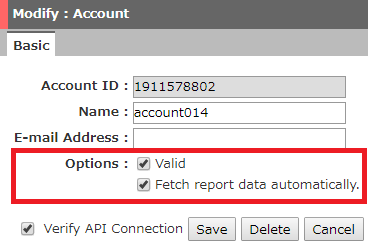
Note: Please deactivate accounts after deleting all schedules set on the account level (not master account level) of that particular account.
Show Inactive Accounts
Once you deactivate an account, the inactive accounts will disappear from the main menu. To re-display them, follow the steps below.
- Click the three-button icon to the right of the search bar.
- Check “Show invalid or hidden items” under Direction.
- Click “Expand”.
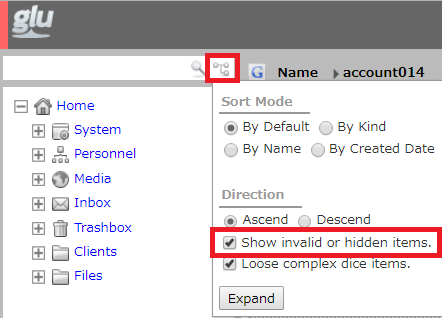
Note: Showing inactive accounts allows you to see its historical data, but you will not be able to export data to Excel reports.
